Warehouse closed · 14–15 September Our warehouse and order fulfilment will be closed on Monday 14 and Tuesday 15 September. Our customer service remains available. Orders will be processed and shipped in order from Wednesday 16 September.
58,00€ incl. 21% VAT
47,93€ excl. VAT


One total figure says little when you want to know where your water goes. The WaterFlowKit v2 measures up to four points at once, shower, boiler, garden tap, including water temperature, live in Home Assistant and fully local.
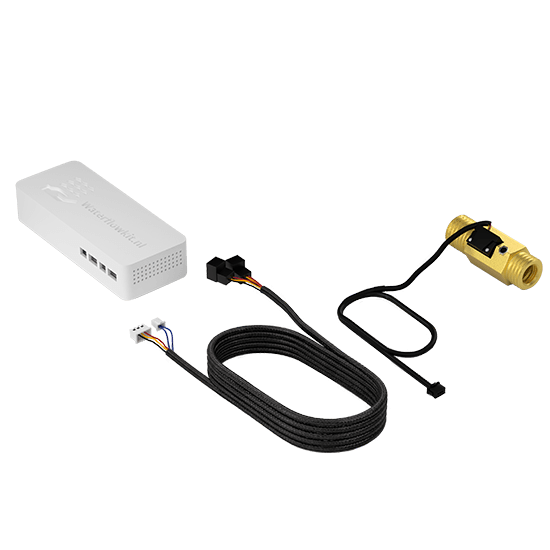
The WaterFlowKit v2 gives you real-time insight into water usage and water temperature per measuring point. Each kit supports up to 4 water flow sensors.
The WaterFlowKit v2 supports WiFi, Ethernet and PoE. The updated hardware is also prepared for Thread/OpenThread, alongside the trusted Home Assistant integration.
The sensors are ordered separately, so you can choose the correct size and material for your pipework. Each sensor includes a 1 meter connection cable and cannot be connected to the WaterFlowKit without this cable.
Available sizes: G1/2" (DN15), G3/4" (DN20), G1" (DN25), G1 1/2" (DN40) and G2" (DN50). View all sizes and applications.
Available in: Brass and Stainless Steel.
Brass: robust and affordable, suitable for most household applications.
Stainless Steel: food-safe, hygienic and recommended for drinking water or when extra durability is desired.
WiFi pre-installed by default:
The WaterFlowKit v2 is delivered with WiFi firmware by default. Prefer to use Ethernet? You can easily install the Ethernet firmware yourself via our firmware page. No different hardware is needed; the choice is entirely software-based.
Power supply:
The WaterFlowKit v2 can be powered via PoE when using a suitable PoE network connection, or via USB-C. PoE is not required; USB-C can always be used as an alternative power supply.
More information, applications and technical details can be found on the extended product page and in the manual.
Order the WaterFlowKit v2 today, with a 14-day cooling-off period you can buy with confidence.
One total figure says little when you want to know where your water goes. The WaterFlowKit v2 measures up to four points at once, shower, boiler, garden tap, including water temperature, live in Home Assistant and fully local.
The WaterFlowKit v2 gives you real-time insight into water usage and water temperature per measuring point. Each kit supports up to 4 water flow sensors.
The WaterFlowKit v2 supports WiFi, Ethernet and PoE. The updated hardware is also prepared for Thread/OpenThread, alongside the trusted Home Assistant integration.
The sensors are ordered separately, so you can choose the correct size and material for your pipework. Each sensor includes a 1 meter connection cable and cannot be connected to the WaterFlowKit without this cable.
Available sizes: G1/2" (DN15), G3/4" (DN20), G1" (DN25), G1 1/2" (DN40) and G2" (DN50). View all sizes and applications.
Available in: Brass and Stainless Steel.
Brass: robust and affordable, suitable for most household applications.
Stainless Steel: food-safe, hygienic and recommended for drinking water or when extra durability is desired.
WiFi pre-installed by default:
The WaterFlowKit v2 is delivered with WiFi firmware by default. Prefer to use Ethernet? You can easily install the Ethernet firmware yourself via our firmware page. No different hardware is needed; the choice is entirely software-based.
Power supply:
The WaterFlowKit v2 can be powered via PoE when using a suitable PoE network connection, or via USB-C. PoE is not required; USB-C can always be used as an alternative power supply.
More information, applications and technical details can be found on the extended product page and in the manual.
Order the WaterFlowKit v2 today, with a 14-day cooling-off period you can buy with confidence.
Want the full story? The official product site shows everything: installation, features and FAQs.
Use the free SmartHomeShop App, connect everything to Home Assistant, or do both. Your choice.
One app for all your SmartHomeShop kits.
Every one of our kits is built for Home Assistant.
Based on reviews

General business rating
star reviews
If you've used this product, share your thoughts with other customers
Write a review
Google
Translated from Dutch Original (Dutch)
Connect up to 4 flow sensors in 5 pipe sizes, available in Brass and Stainless Steel:
G1/2" (DN15): 1–25 L/min, ±3% accuracy
G3/4" (DN20): 1–30 L/min, ±3% accuracy
G1" (DN25): 1–50 L/min, ±5% accuracy
G1½" (DN40): 5–150 L/min, ±3% accuracy
G2" (DN50): 10–200 L/min, ±3% accuracy
Temperature measurement available on G1/2" and G3/4" models (-20 to +80 °C).
Water temperature: 0 °C to +80 °C with ±0.5 °C accuracy (on compatible sensors).
Ambient temperature and humidity monitoring via built-in sensor.
Wi-Fi IEEE 802.11 b/g/n (2.4 GHz), supports WPA/WPA2 security.
Ethernet (RJ45) with Power over Ethernet (PoE) support for a stable wired connection.
Prepared for Thread/OpenThread via IEEE 802.15.4 radio. This is not Zigbee pairing and requires matching firmware, a Thread border router and Home Assistant configuration.
92 x 47.5 x 26.5 mm (main unit)
USB-C power cable: 3 meters
Sensor cable: 1 meter per sensor (detachable connectors on both ends)
USB-C port for power supply (5V, 1A) with included adapter (if chosen).
Power over Ethernet (PoE) for combined data and power via a single cable.
IP52 for sensors (protection against dust and light moisture).
IP20 for the main unit (suitable for indoor use).
-10 °C to +40 °C for the main unit.
Fully integrated with Home Assistant via ESPHome.
Home Assistant Energy Dashboard compatible.
Over-the-air (OTA) firmware updates.
Functions as Bluetooth Low Energy (BLE) proxy.
Thread/OpenThread depends on matching firmware and network configuration.
WaterFlowKit V2 main unit
Selected flow sensors (with temperature measurement if chosen)
USB-C power adapter and cable
Quick start guide
Find answers to the most frequently asked questions about the WaterFlowKit.
The WaterFlowKit is designed for easy installation. You can attach it to the water line of your choice, such as the kitchen or bathroom faucet. Attach the provided flow sensors to the pipeline and connect the kit to your Home Assistant system.
Yes, the WaterFlowKit v2 supports up to four flow sensors. This allows you to monitor water usage at multiple measuring points in your home, for example hot and cold water or different floors.
Besides the WaterFlowKit, you need a working Home Assistant system. WiFi is the standard option, but Ethernet and PoE are also supported with the right firmware and network setup. For PoE you need a PoE switch or PoE injector.
The WaterFlowKit not only measures water consumption in liters per minute, but also the water temperature as it flows through compatible sensors. The main unit also measures the temperature and humidity of the room where the kit is located.
The WaterFlowKit v2 supports WiFi, Ethernet and PoE. The hardware is also prepared for Thread/OpenThread. For most customers we recommend WiFi or Ethernet/PoE; Thread/OpenThread is mainly useful if you intentionally use a Thread network and matching firmware.
Yes, with the WaterFlowKit you can set up notifications in Home Assistant based on custom water consumption thresholds, allowing you, for example, to receive alerts when unusually large amounts of water are consumed.
Yes, you can view and analyze historical data of your water consumption over days, weeks, months, and years in Home Assistant, providing insight into your water consumption patterns.
Yes, the WaterFlowKit is suitable for both cold and hot water lines and can measure the water temperature as it flows through the sensors.
The WaterFlowKit is designed for indoor use and is not recommended for outdoor use where it could be exposed to extreme weather conditions.
No. Thread uses the same 2.4 GHz radio technology as Zigbee, but it is a different protocol. You do not pair the WaterFlowKit v2 as a Zigbee device. Only use Thread/OpenThread with matching firmware, a Thread border router and Home Assistant configuration.
The WaterFlowKit v2 is prepared for Thread/OpenThread, but WiFi and Ethernet/PoE remain the recommended options for normal installations. OpenThread requires a suitable Thread network, a Thread border router and firmware intended for that setup.
Still have questions?
Get in touch with us
WaterFlowKit v2
58,00€ incl. 21% VAT